 Find out what's involved



We have introduced a series of new features to make your event free from any offensive content.
Organizers now have the ability to set up pre-defined guidelines and content submission requirements for Exhibitor Events.
Users can flag any inappropriate content and such exhibitor events can be reviewed by the organizer, who can reject them for security concerns.
The exhibitor is notified of their event’s rejection along with the reason for the same.
This ensures policy compliance and content governance, making the show more transparent and secure.
Note: Exhibitor Events rejected for security concern cannot be appealed – this differs from those that are rejected for technical reasons or improper documentation.
Read below for the full details.
What’s included
1. New status for Exhibitor events – Rejected for Security concern
What is it?
A new status Rejected for Security Reasons has been added to the Exhibitor Event Status list.
The “Rejected for Security Concern” status duplicates the “Rejected” status, but exhibitors cannot resubmit changes to it. Therefore, this status cannot be changed and is final.
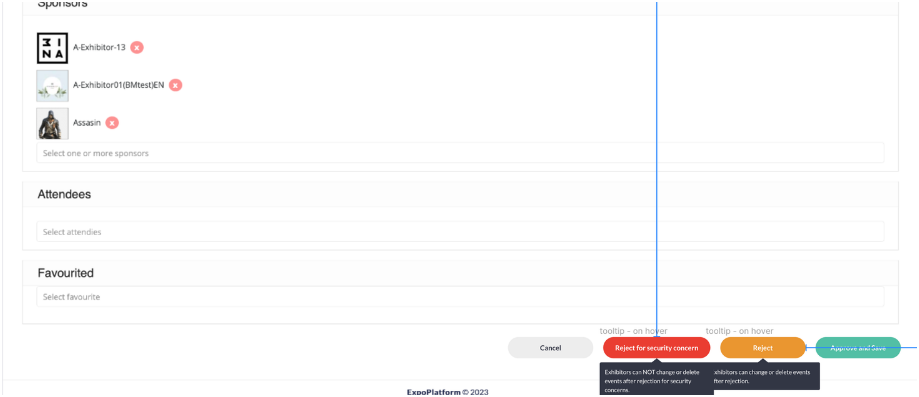
When marking an exhibitor event as rejected for security reasons, the organizer can also select the reason for rejection from a predefined list. This reason for rejection will be visible to the exhibitor on the front end of the event card.
Additionally, a new column Reported is added on the/admin/events page on the admin panel, which shows the count of users who have flagged rejection of the exhibitor events and when the organizer clicks on this number a details report gets opened.
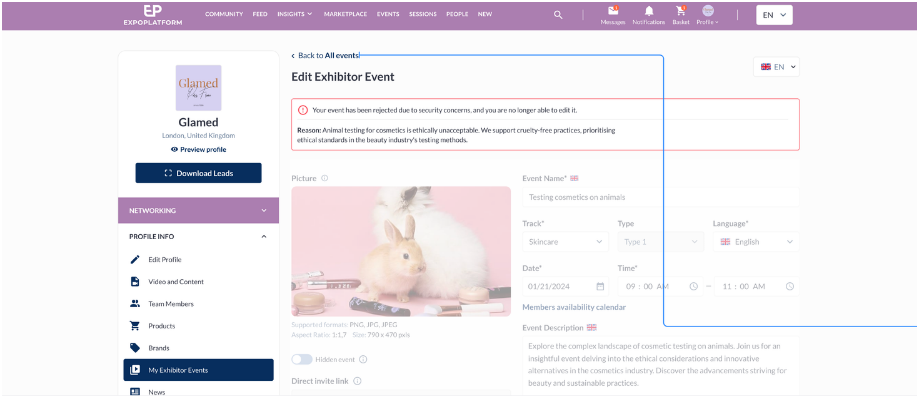
Lastly, Exhibitors receive notifications informing them of the change in status to “Rejected for Security Concern.”
What are the benefits?
This will help organiser to report any inappropriate content added by exhibitor via exhibitor events
2. Users report offensive content in Exhibitor events
What is it?
A new setting added to Session Config tab that enables end-user reporting of offensive content added via Exhibitor Events
Allow Report Offensive Content – toggle determines whether users have the option to report offensive content directly on the front end for Exhibitor Events.
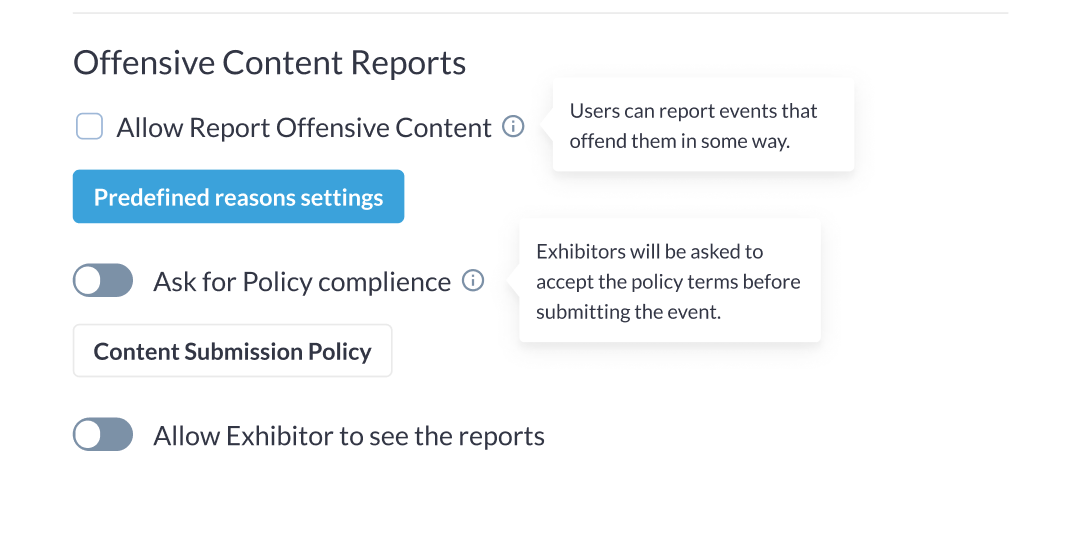
Predefined reasons settings: Allow Organizers to create, modify, or remove a list of preset reasons for marking an event as offensive content
Ask for Policy compliance: Organiser can add a compliance policy that exhibitor should agree to while submitting their event to the platform
Content Submission Policy: It opens a text box where the organiser can add the compliance policy for exhibitor events
Allow Exhibitors to see reports – If the toggle is enabled it allows Exhibitors to access the count of users who have reported their event. They get notified and can view the detailed report,
Default State: Off
What are the benefits?
Enables ability for the user also to report any offensive content added by exhibitors via exhibitor events
3. Users report offensive content in Exhibitor events: Email Template
What is it?
Email Template -> A new template is added to Session >> Email Template
It notifies the organizer when the user reports any event.
This email template flies in every 15 minutes showing the details of all the users who have reported the event in those 15 minutes. If no report is submitted within 15 minutes, no email flies.
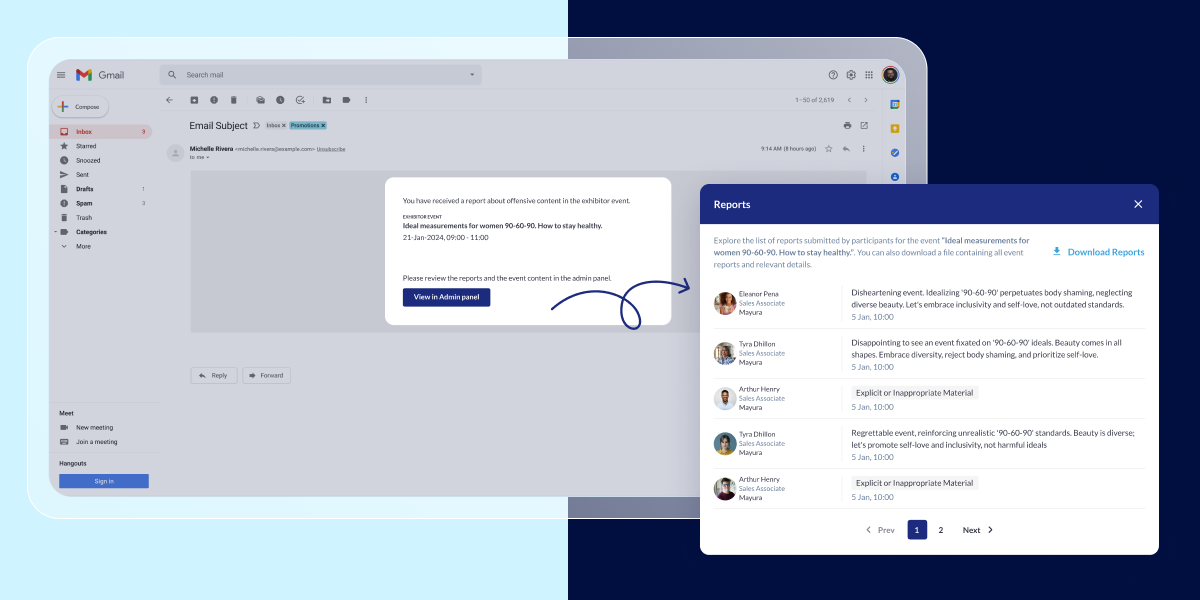
Flow of reviewing Report
When the organizer clicks on the link added to the email the organiser is prompted to log in to the admin panel and then redirected to the exhibitor event and a report detail pops up. The reported data can be downloaded in the xls file.
The report contains the following fields: Name, Job Title, Company Name, Reason for Report and Timestamp.
Once the organizer marks any event as Rejected for Security Concern, he can also enable a checkbox that will notify all the users who have reported the event about its rejection and can also mention the reason for rejection which will be visible to the exhibitor on My Event Page.
What are the benefits?
A detailed report is available on the Admin Panel, showing the details of users who have reported the event.
4. Improved Sessions report with security concern info
What is it?
Enhancement made to the Session export report where we have added 2 additional columns.
- Exhibitor event status – shows the status of the exhibitor event including new one Rejected for security concern
- Offensive content reports – This column will quantify the number of times a session has been reported for offensive content by users.

What are the benefits?
The Session Export report provides organizers with more comprehensive data on Exhibitor Events Status and the time the content is reported as offensive